
Why download the F9999 Bet app?
Most people spend a large part of their day on their phones — commuting by bus, taking a break at work, or winding down at night. Your smartphone is always within reach. F9999 Bet understands this reality and has built a dedicated mobile app with it in mind. No need to open a browser and navigate to the site, no need to type your password every time — install it once and everything is in one place.
One of the biggest advantages of the F9999 Bet app is its speed. It loads much faster than a web browser, games launch instantly, and live streaming runs more smoothly. The app also performs well on low internet connections — which makes a real difference in Bangladesh.
Push notifications are a really handy feature. You'll get instant alerts when a new bonus offer drops, your deposit is confirmed, or a major tournament kicks off — so you never miss an opportunity. For account security, there's also fingerprint and face lock support, letting you log in safely without typing your password every time.
Fast Loading
The app opens in seconds — 3x faster than a browser.
Biometric Login
Log in securely with fingerprint or Face ID.
Push Notifications
Get bonus updates, tournaments, and deposit alerts straight to your phone.
Works on low data
Smooth gameplay even on slow networks — built-in data saver mode included.
Dark mode
Supports dark theme for comfortable night-time play.
In-app payment
Deposit and withdraw directly via Mobile Banking, Nagad, and Rocket.

What games are available on the F9999 Bet app?
The F9999 Bet app is more than just a betting tool — it's a complete gaming platform. Once you open the app, you'll find all sections neatly organized. Finding the game you want takes only a few seconds.
Live Casino
When you enter the Live Casino section in the app, you go straight to a real dealer's table. Baccarat, Roulette, Blackjack, Dragon Tiger — all live streams look great on the app. HD video streaming and real-time chat make it feel like you're sitting in an actual casino.
Sports Betting
From cricket, football, and tennis to kabaddi — the F9999 Bet app covers live odds for all major sports. In-play betting during a match works best on the app, since odds update in milliseconds.
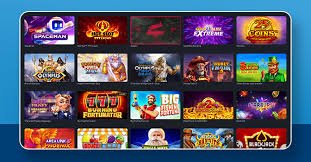
Slots & Casino Games
Browse over 500 slots with ease right in the app. You'll find the best titles from top providers — from classic three-reel slots to jackpot slots. Thumbnails and RTP info are visible in the app, making it easy to pick your game.
Fish Game
F9999 Bet's fish game is hugely popular among young players in Bangladesh. The graphics and controls in the app are far superior to the web version. You can target fish directly on the touchscreen, which makes the experience twice as fun.
App-exclusive bonus offers
Download the F9999 Bet app and log in for the first time to claim your exclusive app-only bonus. This offer is available to mobile app users only — not accessible via the website. Download now and take advantage.
F9999 Bet app — available on both Android and iOS
No matter what operating system your phone runs, the F9999 Bet app is built for you.
Android APK
Download and install the APK file directly, outside of Google Play. The whole process takes just 3 minutes.
Required version: Android 6.0+
File size: Only 32 MB
RAM: 2 GB or more
IOS App
IPhone and iPad users can also use it directly as a web app, without going through the App Store.
Required version: iOS 13.0+
Device: iPhone 7 or newer
Storage: 50 MB free space
Steps to install the F9999 Bet app on Android
Installing an APK outside of Google Play may seem different, but it's actually very straightforward. Just follow the steps below.
Go to phone Settings
Go to Settings → Security (or Privacy) → and enable Unknown Sources. This allows you to install APKs from outside the Google Play Store.
Download the APK file
Download the latest APK file from the F9999 Bet download page. The file will be saved to your Downloads folder.
Open File Manager
Open your phone's file manager and go to the Downloads folder. You'll find the f9999bet.apk file there.
Install
Tap the APK file and hit the "Install" button. Installation completes in just 30–60 seconds.
Log in or Register
Open the app, log in to your account or create a new one. On your first use, you'll receive an app-exclusive bonus.

App vs. Web — a quick comparison
Many people ask — you can already access it through a mobile browser, so why bother with a separate app? This comparison makes the difference crystal clear.
| Features | F9999 Bet App | Mobile Browser |
|---|---|---|
| Loading Speed | Super fast | Comparatively slower |
| Push Notifications | Yes | No |
| Biometric Login | Yes | No |
| Data saver mode | Built-in | No |
| In-app payment | Simple & Fast | Redirect required |
| Live Stream Quality | Optimized HD | Depends on network connection |
| App-exclusive bonus | Available | Not available |
| Home Screen Icon | Automatic | Must be added manually |
Common app issues and fixes
The F9999 Bet app generally runs without any issues. Occasionally, however, minor problems may come up. Here are solutions to the most frequently asked issues.
APK not installing?
If you see an "Install blocked" message, make sure Unknown Sources is enabled in Settings. On Samsung devices, this option is under Settings → Biometrics and Security → Install Unknown Apps. On Xiaomi or Realme devices, go to Additional Settings → Privacy.
App crashing?
If the app crashes, start by restarting your phone. If the problem persists, uninstall the app and download the latest version fresh from the download page. Older APK versions can sometimes contain bugs.
Live stream buffering?
This is usually an internet speed issue. Go to Settings in the app and lower the Video Quality to Medium or Low. This will smooth out streaming and reduce data usage. On a Wi-Fi connection, this issue typically doesn't occur.
Payment not processing?
If you're having trouble with in-app payments, fully close the app and reopen it. For Mobile Banking or Nagad, make sure those apps are also up to date. If the issue continues, reach out via the F9999 Bet support chat.